


- 1. ibisAccount Overview
- 2. Personal Settings
- 3. System Administrator
- 4. Login Authentication Function
- 5. Others
2.1. Account Information Window
The "Account Information" window allows you to edit your personal account's email address, password, nickname, name, etc.
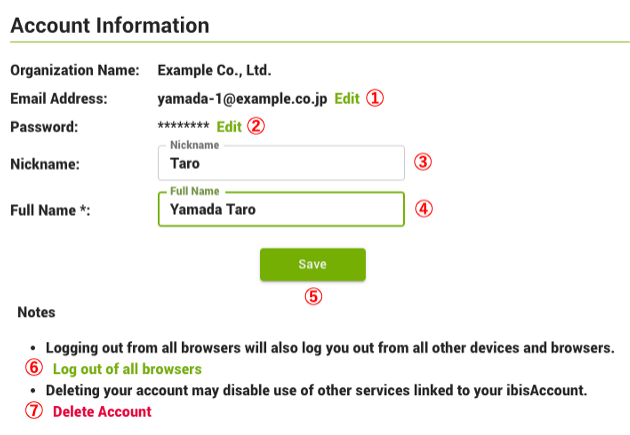
- ① Email Address
- Click "Edit" to change your email address.
- ② Password
- Click "Edit" to change the password.
- This will reset all trusted browsers for Multi-Factor Authentication.
- ③ Nickname
- Enter a nickname.
- ④ Full Name (required)
- Enter your name.
- ⑤ Save
- Save the settings.
- ⑥ Log out of all browsers
- Log out of all browsers logged into ibisAccount.
- This will reset all trusted browsers for Multi-Factor Authentication.
- ⑦ Delete Account
- Delete ibisAccount account.
- If there are multiple users participating in the organization, this option will not be displayed. Please ask another administrator to "Delete" the account from the "User Edit" window.