


- 1. ibisAccount Overview
- 2. Personal Settings
- 3. System Administrator
- 4. Login Authentication Function
- 5. Others
2.2.2. Edit Authentication App Window
The "Edit Authentication App Window" allows you to rename or delete a registered authentication app. It is displayed when you click on a row in the authentication app list.
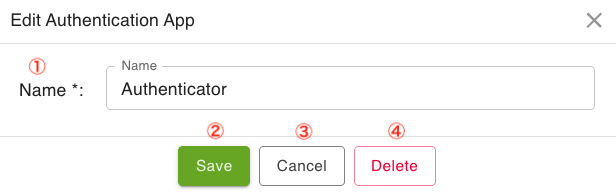
- ① Name
- Edit the name of the authentication app.
- ② Save
- Save the changes.
- ③ Cancel
- Cancels the edited content.
- ④ Delete
- Delete the authentication app. However, if Multi-Factor Authentication is set to "Required (Authentication App)" and there is only one registered authentication app, this option will not be displayed.