


- 1. ibisAccount Overview
- 2. Personal Settings
- 3. System Administrator
- 4. Login Authentication Function
- 5. Others
3.1.1. User Edit Window
The "Edit User" window allows you to check and change the registration information of users participating in your organization and set access privileges to each window of ibisAccount.
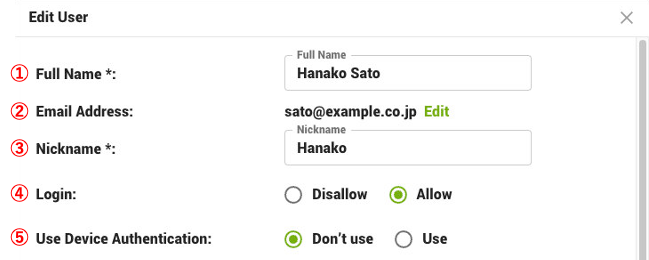
- ① Full Name (required)
- Enter your name.
- ② Email Address
- Click "Edit" to change your email address.
- ③ Nickname (required)
- Enter a nickname.
- ④ Login
- Select "Allow" to allow login to the organization.
- ⑤ Use Device Authentication
- To use the "Device Authentication Function", select "Use".
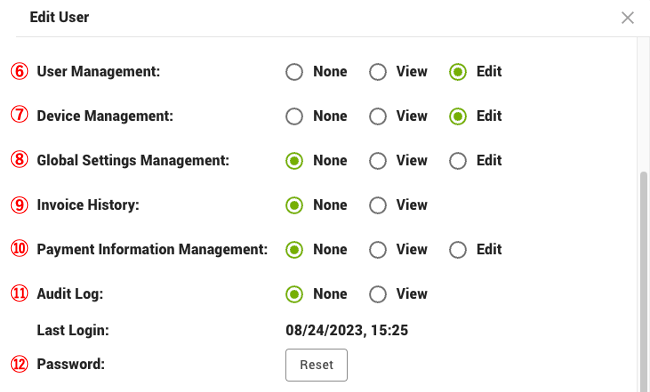
- ⑥ User Management
- Set access privileges for the "Users" and "Edit User" windows.
- ⑦ Device Management
- Set access privileges for the "Devices" and "Edit Device Information" windows.
- ⑧ Global Settings Management
- Set access privileges for the "Global Settings" window.
- ⑨ Invoice History
- Sets access privileges for the "Invoice History" window.
- ⑩ Payment Information Management
- Set access privileges for the "Payment Information" window.
- ⑪ Audit Log
- Set access privileges for the "Audit Log" window.
- ⑫ Password
- Click "Reset" to reset your password.
- This will reset all trusted browsers for Multi-Factor Authentication.
The "Devices in Use" is a list of Devices that users are using to access the organization. If a Device is deleted, access to the organization is disabled from that Device.
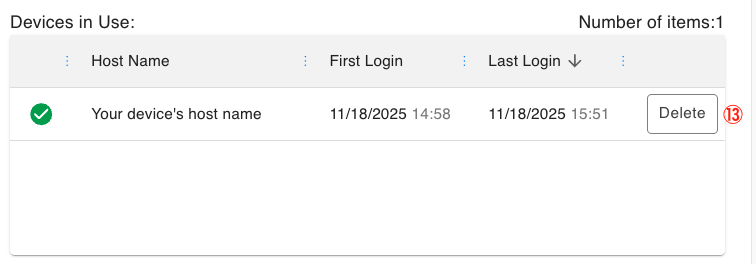
- ⑬ Delete
- Deletes the access rights of the target user to the target Device. Access rights are deleted, but the user and device data remain.
The "Authenticator App List" is a list of authenticator apps that the user is using for multi-factor authentication.
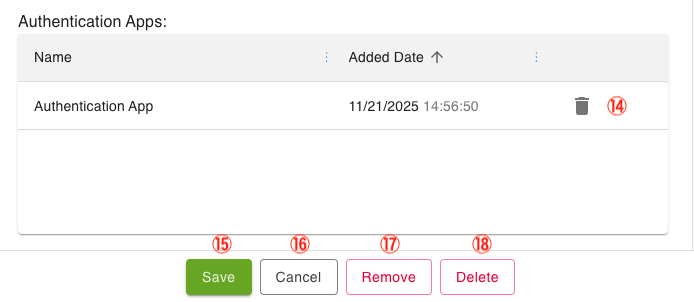
⑭ Trash
- Delete the authenticator app. You can delete it here if, for example, the user has lost the device on which the authenticator app was installed.
⑮ Save
- Save the settings.
⑯ Cancel
- Cancels the setting.
⑰ Remove
- Remove the user.
The removed user will no longer have access to the organization, but the "personal account" in ibisAccount will remain.
- Remove the user.
⑱ Delete
- Delete a user.
The deleted user will no longer have access to the organization and his/her "personal account" in ibisAccount will also be deleted.
- Delete a user.