


- 1. ibisAccount Overview
- 2. Personal Settings
- 3. System Administrator
- 4. Login Authentication Function
- 5. Others
3.5. Global Settings Window
The "Global Settings" window is used to configure settings for the entire organization.
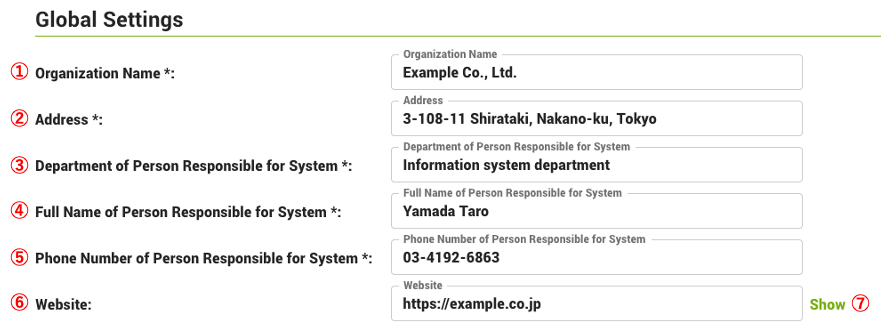
- ① Organization name (required)
- Enter the organization name.
- ② Address (required)
- Enter the address.
- ③ Department of Person Responsible for System (required)
- Enter the name of the department of the person responsible for system.
- ④ Full Name of Person Responsible for System (required)
- Enter the full name of the person responsible for system
- ⑤ Phone Number of Person Responsible for System (required)
- Enter phone number of the person responsible for system
- ⑥ Website
- Enter the URL of the organization's Website.
- ⑦ Show
- Displays the organization's home page.
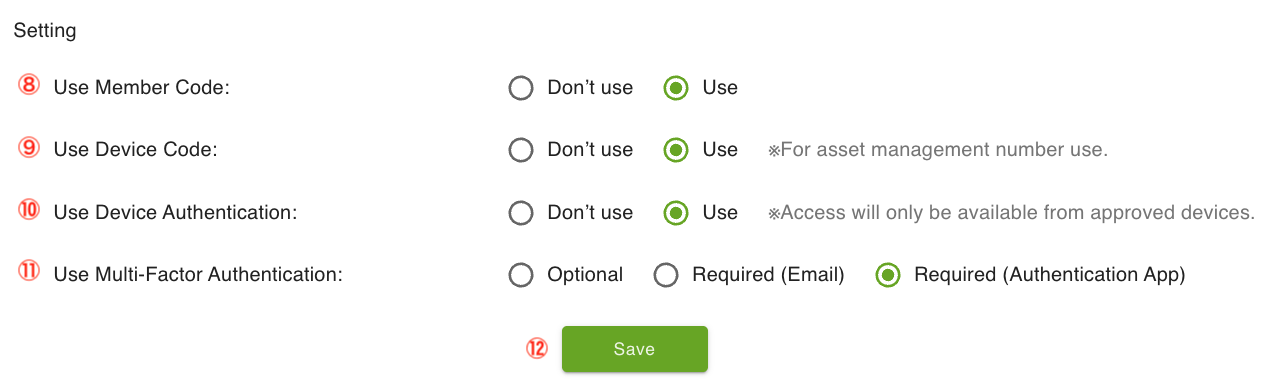
- ⑧ Use Member Code
- If you want to use employee or student numbers, etc., turn on "Use".
- ⑨ Use Device Code
- To use asset management numbers, turn on "Use".
- ⑩ Use Terminal Authentication
- To use the device authentication function, turn on "Use".
- ⑪ Use Multi-Factor Authentication
- Select Multi-Factor Authentication from "Optional", "Required (Email)", or "Required (Authentication App)".
- ⑫ Save
- Save the settings.