


- 1. ibisAccount Overview
- 2. Personal Settings
- 3. System Administrator
- 4. Login Authentication Function
- 5. Others
2.2. Multi-Factor Authentication Settings Window
The "Multi-Factor Authentication Settings" window allows you to configure Multi-Factor Authentication (MFA) settings.
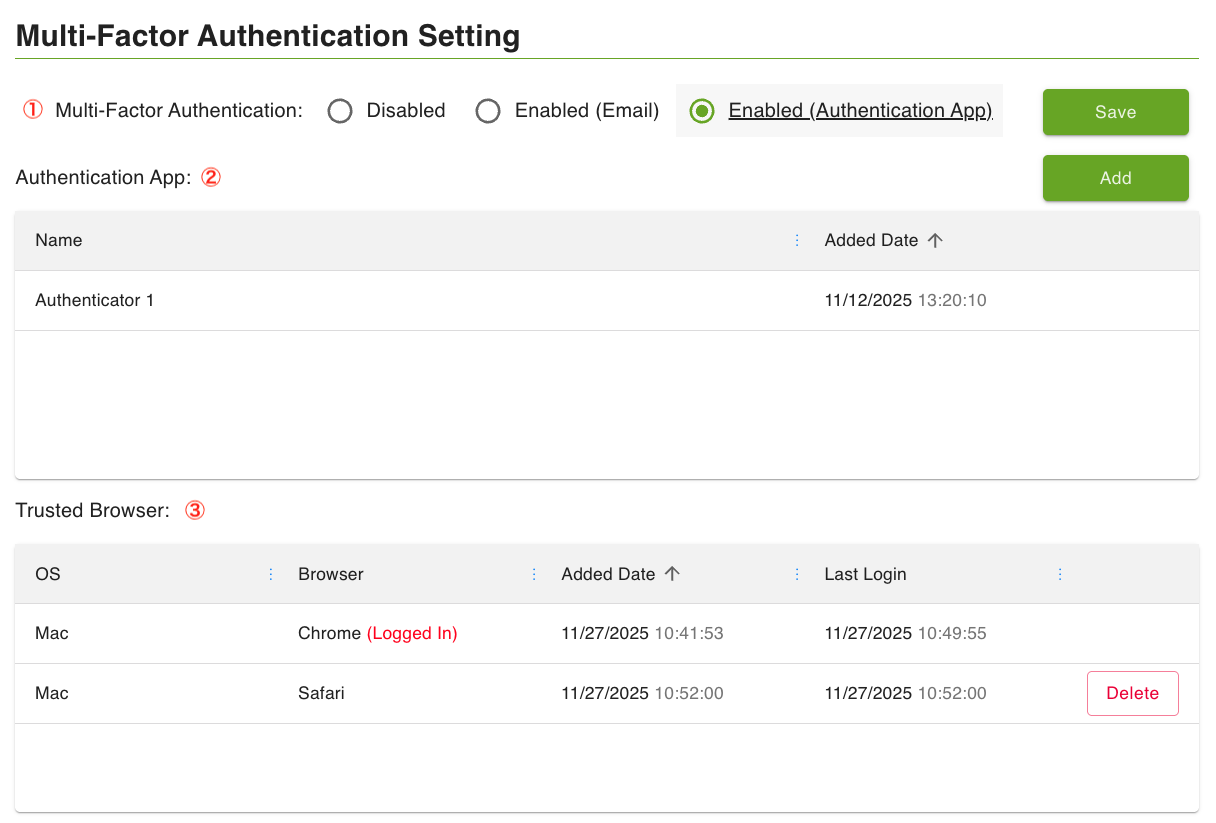
- ① Multi-Factor Authentication
- Select whether to enable or disable Multi-Factor Authentication.
- ② Authentication App
- Register or delete authentication apps.
- Please refer to the FAQ for supported authentication apps.
- ③ Trusted Browser
- View or delete the list of browsers registered as trusted. Multi-factor verification is skipped when logging in from a trusted browser.
- However, you cannot delete the device you are currently logged in with.
- If you want to delete all trusted browsers, please perform "Log out of all browsers" on the "Account Information" window or change your password.