


- 1. ibisAccount Overview
- 2. Personal Settings
- 3. System Administrator
- 4. Login Authentication Function
- 5. Others
3.1.2. Invite User Window
The "Invite User" window allows you to send invitation emails to new users.
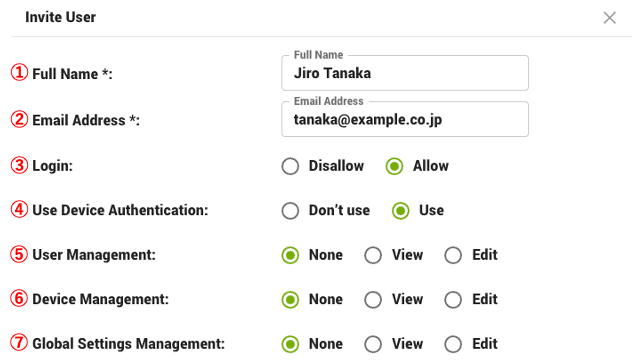
- ① Full Name (required)
- Enter your name.
- ② Email Address (required)
- Enter your email address.
- ③ Login
- Select "Allow" to allow login to the organization.
- ④ Use Device Authentication
- To use the "Device Authentication Function", select "Use".
- ⑤ User Management
- Set access privileges for the "Users" and "User Edit" windows.
- ⑥ Device Management
- Set access privileges for the "Devices" and "Edit Device Information" windows.
- ⑦ Global Settings Management
- Set access privileges for the "Global Settings" window.
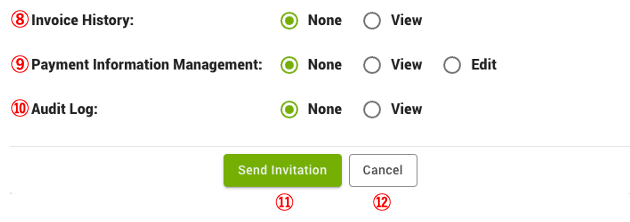
- ⑧ Invoice History
- Sets access privileges for the "Invoice History" window.
- ⑨ Payment Information Management
- Set access privileges for the "Payment Information" window.
- ⑩ Audit Log
- Set access privileges for the "Audit Log" window.
- ⑪ Send Invitation
- Send an email of invitation.
- ⑫ Cancel
- Cancels the setting.