


- 1. ibisAccount Overview
- 2. Personal Settings
- 3. System Administrator
- 4. Login Authentication Function
- 5. Others
3.6. Source IP Restriction Window
The "Source IP Restriction" window allows you to configure IP addresses that are allowed to access the organization.
Editing this screen requires "Global Settings Management" permission.
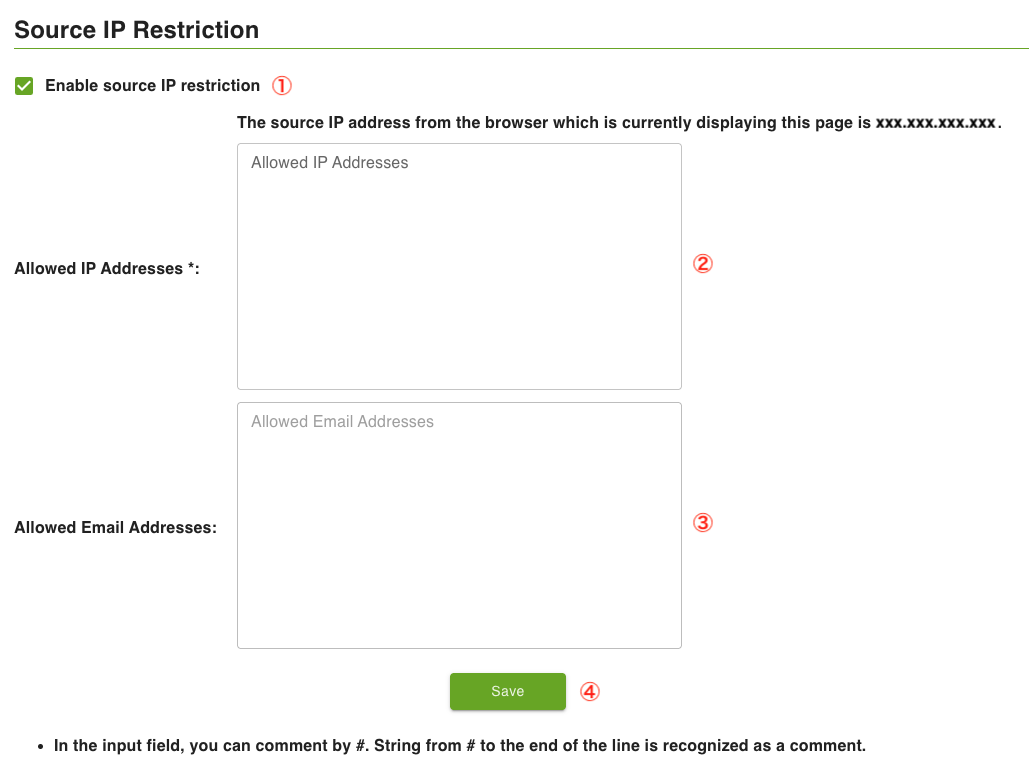
- ① Enable source IP restriction
- Select "Enable" to block access from IP addresses other than those allowed.
- ② Allowed IP Addresses
- Enter the IP addresses to allow. Separate multiple entries with a newline. Text after "#" is treated as a comment.
- ③ Allowed Email Addresses
- Enter email addresses to exclude from IP address restrictions. Separate multiple entries with a newline. Text after "#" is treated as a comment.
- Access is allowed if it matches either the "Allowed IP Addresses" or "Allowed Email Addresses".
- ④ Save
- Save the settings.